
 Electrical preheating
 EV charging solutions
 Lighting
 Chargers and Inverters
 Security & Tracking
IoT Console – User administration
If you don’t already have an user account you need to create an account. Click here
You also need to link your user to a company, click here if you haven’t already done it.
User registration
To edit the company details your user must have an admin status.
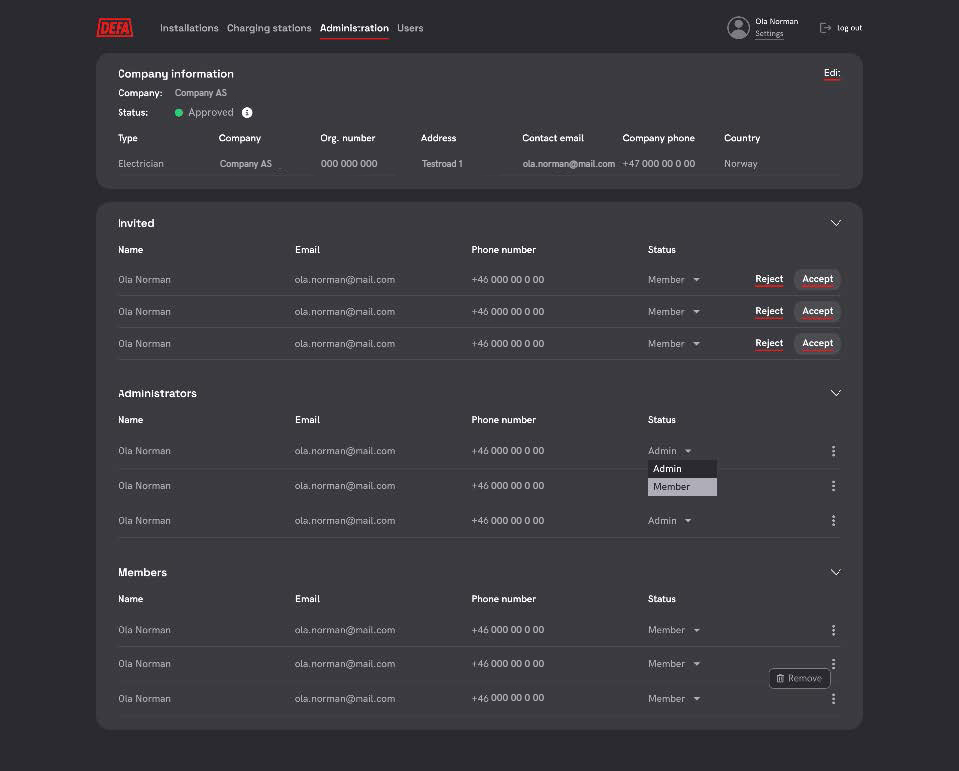
Editing company details
To edit the company details your user must have an admin status.
- Click administration
- On the top right corner of the Company information view – Click edit
- A pop-up window of the company information should appear.
- Edit the information you want
- To save click Update.
Approving user requests
To approve and reject new user requests, your user must have an admin status.
- Click administration
- See user management view and invited users, here you shave have a list of requesting users requesting access to your company.
- Click “Accept” to allow the user to access the installations and charging stations linked to your company or “Reject” to not allow access to your company.

Changing user status

Removing user from your company

Charger administration
How to get access to charging stations
Partner – Can request access. Logged to charging station and company.
CPO – Automatically when they’re handed over to selected CPO.
Installer – Planned. Access is given when they connect to a charging station via setup app.


