
 Electrical preheating
 EV charging solutions
 Lighting
 Chargers and Inverters
 Security & Tracking
Installer – How to install and set up DEFA Power with Perific
Only available in Sweden and Germany
DEFA Power is integrated with Perific Max for dynamic load balancing and the ability to charge the electric vehicle using self-produced solar power. Below you will find the steps for installation and configuration of Perific Max with DEFA Power and the Wi-Fi network of the home owner.
Note! These steps describe a common home installation where Perific Max that communicates with one DEFA Power unit.
You cannot use the DEFA Balancer unit from DEFA together with Perific dymanic load balancing unit.
Preparation:
Before starting the installation as an installer, you need to have an installer account with Perific and the app installed on your smartphone. Make sure to get the customer’s Wi-Fi name and password in advance, as you will use the 2.4 GHz Wi-Fi frequency to add the device to the account.
Ensure that you have access to the HAN/P1 RJ12 port and that it is activated for metering by the grid operator. Some electricity meters do not supply power through the HAN/P1 RJ12 port. In that case, you will need to use the DIN or USB adapter accessories to power the device. If you need help with the installation of Perific One or Perific Max, read more here.
Installation and configuration of DEFA Power:
If this is a new installation, with DEFA Power and solar charging, start with installaton of DEFA Power according to the installer manual. If you have any questions, you can watch the video.
Set up DEFA Power in the set-up app, and handover the charging station to the customer. Watch video here if you have any questions related to this video.
The owner receives an SMS and need to onboard and create a user in the DEFA Power app. Guide the consumer to this article if any questions occur.
If the customer already has the DEFA Power, you start the process from here:
Installation of Perific Max
Connect Perific One to the HAN/P1 RJ12 port on the electricity meter according to the instructions. This process also applies if the homeowner already has DEFA Power installed.
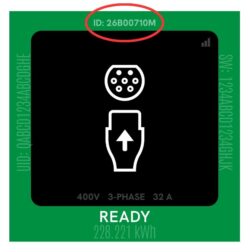
Log in with your installer account in the Perific app to create a new account for a new customer, or log in to an existing account. Once logged in, add the device to the account and then create a reporter. Set up the reporter by entering the DEFA Charger Power ID shown on the charging station’s display.
For a detailed installation guide, visit Perific’s website.
For a detailed integration guide for DEFA Power, visit Perific’s website here.
Published: 23th october, 2024


